
A CCTV camera for a shop in Nepal should cover the entrance, the cash counter and the stockroom or back door. Choose an indoor Wi-Fi camera on steady power, with night vision and SD card recording, and test remote viewing before you rely on it. Shop owners get the most from a few well-placed cameras.
E-kantipur reported on 2 October 2026 that Kathmandu police have drawn up a festival security plan for Dashain, Tihar and Chhath that targets theft and robbery, with CCTV cameras, drones and trained dogs in sensitive areas. Police patrol the streets, but your shop floor is your own to watch.
This guide covers where to place each camera and what to check before you buy. For the wider case for cameras, see why people in Nepal install CCTV.
Quick summary
- Cover the entrance, the cash counter and the stockroom first, then add aisles.
- Mount cameras high and out of reach, and aim them away from bright glass doors.
- Record to an SD card, and keep the router and camera on backup power for short cuts.
- Tell staff where the cameras point, and keep lenses out of changing areas.
Start With the Three Spots Every Shop Needs Covered
Every shop is different, but the same three spots matter. The entrance shows who comes in and out. The cash counter shows every sale, and the stockroom or back door shows where stock leaves.
Any shop security camera plan should cover those first. Tihar week sends crowds into shops, and a busy floor hides small thefts, so test the setup before the rush. If you can afford more cameras, add the aisles and the shutter side later.
A small shop in Bhaktapur may need only two cameras. A large store in Kathmandu with several rooms may need many more, so sketch the floor before you choose a number.
Place the Entrance Camera at Face Height Facing the Door
An entrance camera should see faces as people walk in. Mount it above the door, angled slightly down, so it catches a face and not only the top of a head.
Bright glass doors cause trouble. When the camera points at the street, the sun turns people into dark shapes. Move the camera to the side wall or aim it so the light falls behind it.
Our CCTV installation guide covers mounting height, cable runs and Wi-Fi signal in more detail.
Cover the Cash Counter From Above and Behind
A cash counter camera works best from above and slightly behind the cashier. That angle shows the till and the customer’s face without staring straight into the cashier’s screen.
A camera cannot tell a fake note from a real one. Check cash by hand. The Nepal Rastra Bank banknote guide lists checks such as the watermark when you hold a note to the light and the fluorescent features under ultraviolet light.
Police also list counterfeit currency among the risks in the festival plan above. A camera over the counter records who handed over what, which helps if a dispute starts.
Give Aisles, Shelves and the Back Store Their Own View
High-value stock needs a clear view. Put a camera where it sees the shelf and the person standing at it, and not only the aisle behind.
The back store and rear door deserve a camera even if customers never go there. Most stock losses happen where staff and deliveries move without a customer watching.
If one room is wide, a camera that turns can cover more of it. The Ratri G11 and the Y1-Ratri Dome both pan, and the table below shows how far.
What to Look For in a CCTV Camera for Shop in Nepal Conditions
Look at what the spec sheet lists, not what the box says. A CCTV camera for a shop in Nepal faces long hours, dust and uneven power, so these lines matter most:
- Night vision distance, because shops are dark after closing. NV NightVision spec tables list 8 to 10 meters.
- SD card support, so footage keeps recording if the internet drops. The tables list cards up to 256GB.
- Pan range, if one camera must cover a wide room.
- A built-in siren and two-way audio, so you can warn someone after hours from your phone.
- Human body detection and motion alerts, so your phone buzzes for people and not for every shadow.
Keep footage as long as you need it and no longer. Our guide on how long CCTV cameras store footage explains what stretches or shortens storage.
Plan for Power Cuts and Wi-Fi in a Busy Market Building
NV NightVision cameras are plug-in Wi-Fi models on a 5V supply. When the power or the router stops, recording and live view stop too.
Years of load shedding taught many Kathmandu shopkeepers to keep a small backup battery on the router and the camera supply. It keeps a short cut from leaving your shop blind.
In a crowded market building, Wi-Fi can be weak behind shelves and walls. Test the signal at each camera spot with your phone before you drill any holes.
Tell Staff and Customers About the Cameras
Tell your staff where the cameras point and why. People accept cameras more easily when they hear it from you first, and a short talk now avoids hard feelings later.
Keep lenses out of changing areas and any private room. A small sign near the entrance that says cameras are in use is a sensible habit.
This is general guidance and not legal advice. Ask a lawyer if you are unsure about rules for your shop.
The Y1-Ratri Dome and Ratri G11 Fit Different Shop Layouts
Two NV NightVision models suit shops. The table compares them using their published spec tables.
| Camera | Descriptor | Pan range | Best fit |
|---|---|---|---|
| Y1-Ratri Dome | Mid-range indoor | 180 degrees | Small and medium shops, counters and entrances |
| Ratri G11 | Flagship | 355 degrees | Wide floors and back rooms where one camera must turn across the space |

Both list 4MP video, a 104 degree angle of view, night vision of 8 to 10 meters, two-way audio, a built-in siren, human body detection and SD card support up to 256GB.
Shop the Y1-Ratri Dome now if you want a mid-range indoor camera for the counter or the entrance. You can also order it from its Daraz listing.
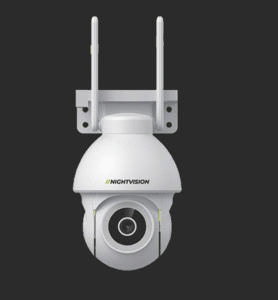
For a wide floor or a back room, see the Ratri G11 and order it. The G11 is also on its own Daraz listing.
Planning cameras for several shops or a whole building? Request a quotation or message us on WhatsApp, and call +977-1-5925995 if you prefer to talk. For current pricing, check each product page.
Walk Your Shop With a Sketch Before You Buy
A shop is busiest when theft is easiest to miss. Walk the floor with a sketch, mark the entrance, the counter and the back door, and test your Wi-Fi at each spot before the festival rush.
Here are your next steps:
- See who we are: about NV NightVision.
- Own a shop, run a security business or buy for several sites? Apply to become a dealer.
- Ask us about shop cameras on WhatsApp, Sunday to Friday, 10:00 to 18:00.
A camera at the right spot gives you a record you can act on when something goes missing.
Common Questions About a CCTV Camera for a Shop
Where should I place a CCTV camera in my shop?
Start with the entrance, the cash counter and the stockroom or back door. Mount each camera high, out of reach, and aimed away from bright glass doors. Add cameras for aisles and shelves once those three spots are covered and tested at night.
How many cameras does a small shop need?
It depends on the layout. Many small shops start with two cameras, one for the entrance and counter and one for the back store. Sketch your floor, mark the blind spots, and add cameras only where the first ones leave a clear gap in coverage.
Can a camera watch my cash counter?
Yes. Mount it above and slightly behind the cashier, so it shows the till and the customer’s face. A camera records the sale but cannot check whether a note is real, so check cash by hand as well and keep the counter well lit.
Can I watch my shop from my phone?
Yes, with a Wi-Fi camera that is online. The camera needs power and a working router, and your phone needs mobile data or Wi-Fi of its own. Test the live view from outside the shop on mobile data before you depend on it after hours.
What happens to the cameras during a power cut?
Plug-in Wi-Fi cameras and the router stop when the power does, so recording and live view stop too. A small backup battery on the router and the camera supply covers short cuts. A long outage will still stop both, so plan for it.
Where can I see the cameras before I buy?
Ask a dealer to show you the cameras and talk through your layout. You can find an NV NightVision dealer near you and bring your floor sketch and a note of your Wi-Fi setup. Call ahead, because shop hours can change in festival weeks.