
An IP camera is a CCTV camera that sends digital video over a network, either through Wi-Fi or an Ethernet cable. Traditional CCTV usually means analog cameras wired to a DVR recorder. For most Nepal homes, a Wi-Fi camera is the simpler choice, while large wired sites may still suit analog cabling.
Search for the ip camera vs cctv difference and the answers get confusing, because an IP camera is one type of CCTV. This guide explains how the two differ in cabling, recording, internet use and security. It also covers CCTV with IP camera setups that mix both, and whether a network camera needs internet.
Not sure which camera shapes exist? Our guide to the types of CCTV camera is a good starting point.
Keywords
- An IP camera is a kind of CCTV camera that sends digital video over a network.
- Classic analog CCTV sends video over coaxial cable to a DVR.
- Pick Wi-Fi cameras for homes, apartments and small shops with a good router.
- Pick wired cabling for large sites with long runs and no reliable Wi-Fi.
An IP Camera Is a Type of CCTV, Not a Rival to It
CCTV is the broad name for camera systems that send video to a private set of screens or recorders. A network camera fits that description, so every IP camera belongs to the CCTV family.
People still use the two words differently. In shops and installer talk, CCTV usually means the older analog setup, and an IP camera means a network camera you can reach by app. That everyday split is the one this guide follows.
The choice matters more than the label. It decides how you run cables, what recorder you buy and how you watch the picture when you are away.
The Main Difference Between an IP Camera and CCTV Is How Video Travels
An analog camera sends its picture as an analog signal over coaxial cable to a DVR. The DVR converts the signal to digital video, then stores it.
An IP camera does that conversion inside the camera. It sends digital video over your network to an SD card, an NVR or the cloud, and you can reach it from a phone app. Our guide on how to connect wireless cameras to an NVR shows the recorder side.
| Point | IP camera | Analog CCTV |
|---|---|---|
| How video travels | Digital video over Wi-Fi or Ethernet | Analog signal over coaxial cable |
| Recorder | NVR, SD card or cloud | DVR |
| Cabling | Power plus Wi-Fi, or one network cable | A cable run from every camera |
| Remote viewing | Built in through an app | Needs a compatible recorder and setup |
| Picture detail | Commonly higher resolution | Often lower on older systems |
| Suits | Homes, apartments and small shops | Large sites with existing cable |
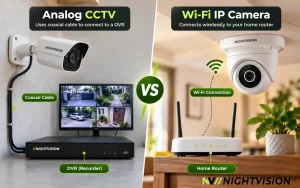
Cabling and Power Decide How Hard the Installation Is
Analog CCTV needs a cable from every camera to the recorder. In a Kathmandu apartment with shared walls, that can mean drilling and long runs.
A Wi-Fi camera skips most of that. It needs a power point and a good signal, and a mounting spot with a clear view.
Neither type runs without electricity. The load shedding years taught many families that the router and recorder stop in a power cut too, so a small backup battery helps.
An IP Camera Needs a Network but Not Always the Internet
Many people ask does ip camera need internet, and the answer has two parts. A camera needs a network, but it does not always need the internet. Many Wi-Fi cameras keep saving to an SD card or an NVR when the connection drops.
What stops without internet is remote viewing and app alerts. Our post on whether wireless CCTV can work without internet explains what keeps running.
This matters during Dashain. If you travel to your village and want to check the house, you need both a working router and an internet connection at home.
Picture Quality and Storage Differ Between the Two
Modern network cameras commonly offer higher resolution than older analog cameras. Newer analog HD systems narrow the gap, so check the resolution on each product page.
Storage also differs. Analog systems record to a DVR hard disk, while a network camera can record to an SD card, an NVR or the cloud.
Costs vary by system, camera count and cable length. For the camera side, our full price list covers the models and each product page carries current pricing.
Online Cameras Bring Network Security Duties
Anything on a network can be targeted, and a camera is no exception. The FBI’s Private Industry Notification of December 2024 describes scanning campaigns against web cameras and DVRs that looked for known vulnerabilities and weak vendor-supplied passwords. Notice that DVR-based CCTV was targeted too.
Closer to home, The Himalayan Times reported in August 2026 that Nepal Police registered 20,526 cybercrime-related complaints in fiscal year 2082/83. Online devices deserve basic care.
Change the default password, keep the camera app and firmware updated, and share camera access only with people you trust. No camera is unhackable, but these habits close the easy doors.
Choose by Your Site, Your Router and Your Plans
Match the camera type to the place. Use these rules of thumb:
- Choose Wi-Fi cameras for apartments, houses and shops where the router reaches the spot.
- Choose wired cabling for a large compound where Wi-Fi is weak and cable is already in the walls.
- Choose a hybrid recorder only if you must keep old analog cameras and add a few IP ones.
A CCTV with IP camera setup works only when the recorder accepts both types, so check the recorder’s specifications before you mix them. For a wider comparison of home options, see our home security camera guide.
If you cannot decide, start with one Wi-Fi camera at the most important door. You can add more cameras later without a new cable run.
NV NightVision Netra V6Z Is an Affordable Wi-Fi Camera
For a first network camera, shop the Netra V6Z now if you want an affordable Wi-Fi model. Its spec sheet lists 4MP video, two-way audio, a built-in siren, human body detection and night vision of 8 to 10 meters.
The V6Z records to an SD card of up to 256GB, and the card is not included. It shows one fixed view, with no pan range listed, which suits a hallway, a shop counter or a living room.
[IMAGE 3]
File name: nv-nightvision-netra-v6z-affordable-wifi-nepal.webp
Alt text: NV NightVision Netra V6Z Wi-Fi camera on a white shelf beside a phone showing the live view
Caption: The Netra V6Z pairs with a free Android and iOS app.
Dimensions: 800×800 product
You can also order it from its Daraz listing. For several cameras or a custom setup, request a quotation or message us on WhatsApp.
Want to compare more models first? Browse the NV NightVision Wi-Fi series and pick the indoor or outdoor model that fits your spot.
Pick Your Camera Type Before Dashain Travel Starts
Dashain holidays start soon, and many families will leave their houses for days. Settle the camera type now, test the live view from your phone, and you can travel with less worry.
Here are your next steps:
- See who we are: about NV NightVision.
- Ask us which IP camera suits your home on WhatsApp, Sunday to Friday, 10:00 to 18:00.
The right camera is the one that fits your walls, your router and your daily routine, so choose for your home and not for the label.
Common Questions About IP Cameras and CCTV
What is an IP camera?
It is a camera that sends digital video over a network, through Wi-Fi or an Ethernet cable. It does not need a coaxial cable to a DVR. You watch it through an app, a browser or an NVR, and it can record to an SD card.
Is an IP camera the same as CCTV?
In a sense, yes. It is a type of CCTV, but people often use CCTV to mean the older analog system with a DVR. Both send video to a private set of screens or recorders. The difference lies in how the video travels and where it is processed.
What is the main IP camera vs CCTV difference?
The main difference is the signal. Analog CCTV sends an analog signal over coaxial cable to a DVR, while an IP camera sends digital video over a network. That changes cabling, recording options, remote viewing and how much picture detail you can expect.
Does an IP camera need internet?
It needs a network, not always the internet. Many keep saving to an SD card or NVR when the internet drops. You need the internet for remote viewing and app alerts, so keep the router powered if you want to check in while away.
Can I use a CCTV with IP camera setup on one recorder?
Only if the recorder supports both. Hybrid recorders accept analog and network cameras, but many recorders accept only one type. Check the recorder’s specifications before you buy, and ask the seller to confirm in writing that the mix will work.
How do I protect an IP camera from misuse?
Change the default password, update the camera app and firmware, and share access only with people you trust. Keep the camera on a router with a strong Wi-Fi password. These steps lower the risk, but no online device is risk-free.
Which should I buy for my home?
For most homes and apartments, a Wi-Fi camera is the simpler choice because it needs no cable run to a recorder. Choose wired cabling only for a large compound where Wi-Fi is weak. If you are unsure, find an NV NightVision dealer near you.